
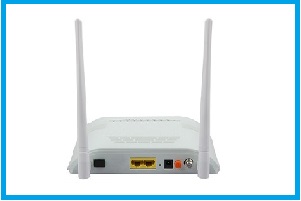
1GE+1FE+WIFI+CATV GPON ONU
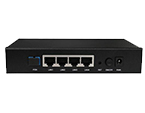
1GE+1FE+WIFI+CATV GPON ONU, mainly designed for FTTH,FTTO application. BD-ONU-822RWT-G support 1000Base-PX20+ standard with 1:64 maximum optical splitting ratio and 20km distance.
INFORMATION
Brief Views
BD-ONU-802RWT-G is mainly designed for FTTH,FTTO application. BD-ONU-822RWT-G support 1000Base-PX20+ standard with 1:64 maximum optical splitting ratio and 20km distance, and provide 1uplink GPON port.
BD-ONU-802RWT-G work together with OLT could realize flexible network structure and maintenance and provide total FTTx solutions.
The GE wifi ONU has 1 PON port ,1* 10/100BASE-T port, 1* 10/100/1000BASE-T port,1*CATV port and support Wi-Fi.
Feature
► Deul Mode( can access gpon/epon olts ).
► Plug and play, integrated auto detecting, auto configuration, and auto firmware upgrade technology.
► Full compliance to IEEE 802.3ah specification & OAM function.
► Support 802.11n 2T2R speed up to 300Mbps.
► Support rich VLAN, DHCP Server and IGMP snooping multicast feature.
► Advantage traffic management
► Advanced Dynamic Bandwidth Allocation (DBA)
► The WAN port supports bridge or router mode.
► Advanced L2 features QinQ VLAN & QoS support.
► Support NAT, Firewall function.
► Support Console/ Telnet/ NMS management interface for ease of operation and maintenance.
► Support 2K MAC address table.
► Fully compatibility with OLT based on Broadcom/PMC/Cortina chipset.
Function
Data Service Functions
► Full speed non-blocking switching.
► 2K MAC address table.
► 64 full range VLAN ID.
► Support QinQ VLAN, 1:1 VLAN, VLAN reusing, VLAN trunk,
etc.
► Integrated port monitoring, port mirroring, port rate
limiting, port SLA, etc.
► Support auto polarity detection of Ethernet ports (AUTO
MDIX).
► Integrated IEEE802.1p QoS with four level priority queues.
► Support IPv4 IGMP snooping and IPv6 MLD snooping.
► Support bridge, router and bridge/router mixed mode.
WIFI
Service Functions
► Integrated 802.11b/g/n, 300Mbps, 2T2R.
► Support 128 connections.
► Support WEP and WPA/WPA2 security protocols.
CATV Service Functions
► RF frequency: 45~875MHz.
► Turn on/off RF output remotely.
► RF level can be showed on PC Web real time.
► AGC Dynamic Range
(dBm) :-6~+2
► RF Output Level(dBuv):80
Specification
|
Technical item |
1GE+1FE+WiFi+CATV |
|
PON interface |
1 GPON connector, SC single-mode/single-fiber, downlink/uplink 1.25Gbps. |
|
Wavelength |
Tx1310nm, Rx 1490nm, CATV 1550nm. |
|
Optical interface |
1 PON interface, 1 CATV interface, SC connector |
|
LAN interface |
1x 10/100/1000Mbps auto adaptive Ethernet interfaces and 1x 10/100M Full/Half. RJ45 connector. |
|
RF interface |
1 RF output interface. |
|
Wireless |
Compliant with IEEE802.11b/g/n, 300Mbps, 2T2R. |
|
LED |
7, For Status of POWER, LOS, REG, GE, FE, CATV and WiFi. |
|
Operating condition |
Temperature: -5℃~55℃ Humidity: 10%~90%(non-condensing) |
|
Storing condition |
Temperature :-30℃~60℃ Humidity :10%~90%(non-condensing) |
|
Power supply |
DC 12V/1A |
|
Power consumption |
≤8W |
|
Dimension |
158mm×115mm×33mm(L×W×H) |
|
Net weight |
0.4Kg |
|
Technical item |
1GE+1FE+WiFi+CATV |
|
PON interface |
1 GPON connector, SC |
|
Wavelength |
Tx1310nm, Rx 1490nm, CATV 1550nm. |
|
Optical interface |
1 PON interface, 1 CATV interface, SC |
|
LAN interface |
1x 10/100/1000Mbps auto adaptive Ethernet |
|
RF interface |
1 RF output interface. |
|
Wireless |
Compliant with IEEE802.11b/g/n, 300Mbps, |
|
LED |
7, For Status of POWER, LOS, REG, GE, FE, |
|
Operating condition |
Temperature: -5℃~55℃ Humidity: 10%~90%(non-condensing) |
|
Storing condition |
Temperature :-30℃~60℃ Humidity :10%~90%(non-condensing) |
|
Power supply |
DC 12V/1A |
|
Power consumption |
≤8W |
|
Dimension |
158mm×115mm×33mm(L×W×H) |
|
Net weight |
0.4Kg |
Application
Typical Solution:FTTH,FTTO,PON+EOC
Typical Business:INTERNET, IPTV, VOD, IP Camera, WIFI

FAQ
Question: After restarting the XPON ONT to factory when I want to enter the password it does not accept me and show the following message:
192.168.1.1/boaform/admin/formLogin
ERROR: bad password!
I have tried reset wifi catv onu to factory again but it continues denying access
Answer: The problem is caused by wrong password. Please input the correct defaut password after reset.The default password is stdONUi0i
Related Products
Send an Inquiry
Tell us your required quantity, destination country, and any technical requirements. We'll reply within 12 hours.