
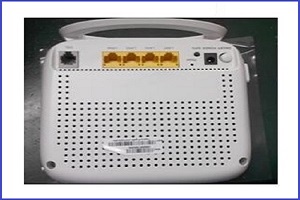
4Ports 1000M Ethernet Switch SHDSL Router Modem
Overview This is a 2-Wire SHDSL CPE that complies with PAM16 Line Code, G.991.2, and G.994.1 standards, and is equipped with an Ethernet switch with four 10/100BaseTX auto-sensing ports. The SHDSL Router provides basic Internet access via a 10/100Mbps Ethernet switch, and a SHDSL WAN port with routing function over SHDSL.
INFORMATION
Model:
BD-SHDSL-M4

Overview
This is a 2-WireSHDSL CPE that complies with PAM16
Line Code, G.991.2, and G.994.1 standards, and is equipped with an Ethernet
switch with four 10/100BaseTX auto-sensing
ports. The SHDSL Router provides basic
Internet access via a 10/100Mbps Ethernet switch, and a SHDSL WAN port with routing function over SHDSL.
Features
- High Speed Symmetrical Data Transmission on one Pairs of Twisted Copper
Wire ITU standard PAM16 Line Code, comply with G.991.2 and G.994.1 standards
Support Annex A and Annex B mode
operation - Support
Wetting Current range from 0.3mA to
3mA
- One
Switching hub with 4 * 10/100Mbps auto-sensing ports for PC
or LAN connection
- Provide the broad range of Symmetrical Multi-rate Data Transmission from 144 Kbps
up to 2.3 Mbps
- Support PPPoE (RFC2516), PPP (RFC2364) and IP (RFC 2225/RFC1577) over ATM
over SHDSL
- RFC2684 (RFC1483) Bridged/Routed
for both LLC/VC MUX Support IP unnumber - Support
VLAN
- Support
Port-PVC function - DHCP
server supported for easy LAN IP address management - Allows
LAN users to access Internet through Network
Address Translation (NAT, IPsharing)
simultaneously
- Local
OAM&P through command line interface via RS-232
Craft port
- Configuration and management by local Telnet, SNMP, and WEB Browser through the Ethernet interface and remotely
through SHDSL interface - Firmware
upgradeable through TFTP - High performance, simple operation and low power
consumption


Connection with DSLAM point to multi-point application

Console management
Console Port – use the RS-232 cable for connecting the modem to a console terminal or a PC running a terminal
emulation program, such as Hyper Terminal.
Telnet management
Local Ethernet Port (Telnet) – connect the Ethernet port to your local area network or directly to a PC, “telnet” the modem from any workstation in the LAN. The default local Ethernet IP address is
“192.168.1.1 ”.

WEB management
The WEB management
interface is provided in order to manage the modem device as easily as
possible. It provides a very user-friendly configuration and graphical
interface through a web platform. You may configure a bridge or a router
function to accommodate your device need. In the section below, each
configuration item will be described in detail.
Navigation Bar

Related Products
Send an Inquiry
Tell us your required quantity, destination country, and any technical requirements. We'll reply within 12 hours.